vendredi 1 juillet 2016

Sony DualShock 3 Wireless Controller (Black) review


when Sony's PlayStation 3 came out in late 2006, much was made over the fact that the new Sixaxis wireless controller that shipped with the system didn't offer any force feedback--or rumble, as the vibration feature in Sony's earlier DualShock 2 controller (for the PlayStation 2) is often called. Sure, the whole poor-man's Wii motion-sensing thing (Sixaxis) was somewhat cool, but PlayStation aficionados and gaming purists were disappointed that Sony was forced to leave out the rumble because it was involved in a patent dispute with Immersion, the company that developed force-feedback technology.
Well, the legal issues have been resolved and Sony is now selling the DualShock 3, which should have come with the PS3 when it launched. The good news is the rumble works just fine with the limited number of PS3 titles that currently support the feature. (The full list of DualShock 3-compatible games is available at Sony's PlayStation Web site. The feature can be retroactively added to many older games thanks to downloadable patches available through Sony's free PlayStation Network online service.)


We tried the DualShock 3 with Heavenly Sword and Resistance: Fall of Man. While the rumble really didn't add much to Heavenly Sword, it was more effective with a first-person shooter such asResistance, as it enhanced the feeling of firing your gun and taking hits. We also liked that the DualShock 3 (7 ounces) is somewhat heavier than the original Sixaxis controller (5 ounces). It isn't a huge deal, but it just feels more substantial in your hand. Some people complained that the Sixaxis controller was just too much of a featherweight, and if you're one of those people, you'll appreciate the extra 2 ounces this controller adds.
The Sixaxis motion-sensing feature is still present and accounted for along with the familiar Bluetooth wireless connectivity. Unfortunately, the DualShock 3 retains the annoyances of its predecessor. Chief among them: the built-in lithium-ion rechargeable battery isn't removable, so when it eventually dies (admittedly, probably several years down the road), you'll have to buy a completely new controller. (By contrast, the Xbox 360 and Nintendo Wii have user-replaceable battery packs.)
The other major gripe with the DualShock 3 is the $55 price tag. That's anywhere from a $5 to $15 premium over the street price of Xbox 360 andWii controllers, as well as the existing Sixaxis PS3 controller (which will bediscontinued now that the DualShock 3 is available). To add insult to injury, Sony doesn't even throw in a USB cable for recharging.

Review: The camera-packin' Hubsan X4 FPV mini quadcopter

A front view of the FPV
The problematic battery wiresIt was just a few months ago that we showed you what is probably the world's smallest consumer quadcopter, the tiny Estes Proto X. Although it's a marvel of modern engineering, Gizmag writer Jonathan Fincher noted that it lacks any particularly interesting features, such as a camera. Well, late last year, Hubsan released its X4 H107D FPV. It's not much bigger than the Proto X, and it has a camera that transmits a real-time video signal to the user. When I heard about it, I knew I had to try it out.The FPV as it comes out of the box, with its charging cable and spare props
The FPV as it comes out of the box, with its charging cable and spare props

The eye in the sky

Hubsan's other X4 quadcopters have already proven quite popular with hobbyists. The previously-released H107C model also has a camera, although it doesn't provide a live feed. Instead, users have to watch the recorded footage after the fact.
With the FPV, however, they can see what the camera's seeing as it sees it, via a 4.3-inch color LCD screen in the control unit. This makes it possible to fly by first-person-view (hence the FPV in its name), although a wider lens would make doing so considerably easier. It's also possible to start and stop recording via a single button on the controller.
The camera itself is nothing special, with its 0.3-megapixel sensor and 640 x 480 resolution. Although the picture is displayed on the monitor at 720 x 480, it's rather bizarrely recorded at a squat 720 x 240. This means that if you plan on using the recorded footage for anything, you'll have to run it through a converter to stretch it from 240 to 480. While Hubsan does provide links to a couple of free Windows-based converters, I couldn't find any aspect ratio-altering freeware that would work on my Mac. Eventually, I gave in and purchased AnyVideo Converter HD for six bucks, although I really shouldn't have had to.
Additionally, depending on where you're flying it, the video can get quite glitchy by the time it reaches the monitor. This might not matter if it were recorded onboard the quadcopter, but it's not. Instead, it's recorded on a Micro SD card in the controller, meaning that all the glitches are present in the video by the time it's recorded. That said, most users will probably be more interested in using the camera just to fly the thing

The quadcopter itself

The FPV measures about 4.5 inches (114 mm) diagonally, looks beautiful, and feels nice and solid in hand. One charge of its 3.7-volt 380-mAh lithium polymer battery takes about 30 minutes via an included USB cable (which can be difficult to disconnect), and is good for around seven minutes of flight time. This means that learning to fly the thing has to be done in numerous short installments.
Once the battery is juiced up, its charging receptacle wire has to be sort of twisted around, folded over, and stuffed into a little compartment in the back of the aircraft. It's hard getting it to stay in there, however, plus my copter has developed a short in that wire from all the manipulation. It would be far better if there were simply a clip or something similar to hold the wire in place, without placing so much stress on it.

Taking it up

As for actually flying the sucker ... well, a search on YouTube will show you that there are plenty of experienced RC aircraft hobbyists out there who are quite adept at piloting the FPV. My only previous quadcopter experience has been with the DJI Phantom andPhantom 2 Vision, and while they're certainly more intimidating to fly (because they're so big and expensive), they're also a lot easier. This is mainly due to the fact that they both use GPS to hold their position in mid-air.

The GPS-less FPV, on the other hand, tends to drift around quite a bit. Although it's certainly possible to get it to go more or less where I want, I find that a lot of the time, flying it is almost like a game – it routinely tries to head off in one random direction or another, and it's my job to keep it from doing so. Keeping it hovering in one place is pretty much out of the question.
This is doubtless doing wonders for my hand-eye coordination, but it can be a little frustrating at times. I've only had it a few weeks so far, though, so hopefully my skills will improve. In the meantime, it's a good thing that the FPV is so tough. I've crashed it more times than I could possibly remember, and the only visible damage has been some bashed-up propellers (I'm currently on my second set). That did prompt me to install its prop guard, although that itself has already snapped in one spot.
The claimed maximum control and video range is 100 meters (328 ft), although I've yet to put that to the test. I have tried taking the quadcopter outside, but it's pretty easily pushed around by even moderate winds.

Shelling out

The X4 FPV sells for around US$200. Is it worth it? I would say yes, provided that:
  • You don't plan on using the video for anything other than FPV flying

  • You take it easy on the battery wire
  • You don't expect to be an expert pilot right away
  • You're not buying it because you think that it'll be easier to fly than one of the "big boys" (although it's not as big of a deal when you crash it)

  • Speaking of fancier quadcopters, a Hubsan rep has informed me that the company is developing a "better, larger" X4 that will supposedly offer more functions than the DJI Phantom 2 Vision. It might be coming our way in March, so we look forward to getting our hands on it.
    For now, though, you can check out the short-but-sweet video below, in which my friend Kevin and I give the FPV a whirl in a warehouse ... and despite the way it's edited, I must admit that it was actually me who was flying it in the final shot.

    Top 5 Troubleshooting Tips for an iPod Mini

    Top 5 Troubleshooting Tips for an iPod Mini


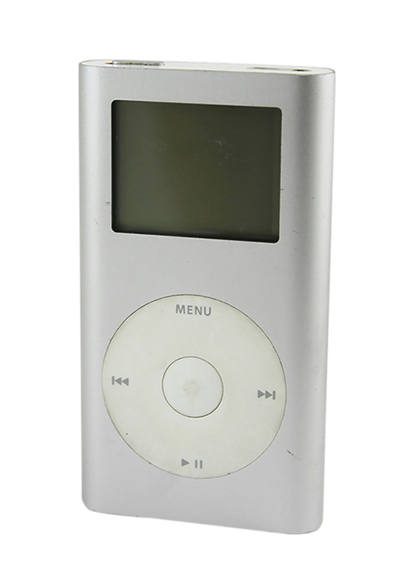
    For years now, the iPod Mini has been your constant companion at the gym, supermarket, and on your way to work. You can count on it to brighten up a dull commute, motivate you on the treadmill, and entertain you whenever you are bored. But just like any other electronic device, you
    r iPod Mini may malfunction at some point, whether due to wear and tear or an accident. Before visiting the Apple store to get your iPod Mini repaired, check out these simple troubleshooting tips that can help you diagnose the problem and maybe even fix it yourself.

    How to Troubleshoot an iPod Mini

    Before fixing your iPod Mini, first identify whether you are using a first or second-generation model. While the two versions look almost identical on the outside, the inner workings are different. When replacing certain parts like the display assembly or the battery, make sure you choose parts compatible with your specific model.

    Resetting Your iPod Mini

    Before panicking that there is something wrong with your iPod Mini's battery or logic board, do some basic troubleshooting. If your device has frozen up, sometimes a simple reset is all it takes to get your device back to normal.
    To reset your iPod Mini, slide the Hold switch to the Hold position and then slide it back to the Off position. Press the Menu and the Select buttons simultaneously; hold them for 6 to 10 seconds until you see the Apple logo. If this does not work, check to see if you have a battery problem by connecting your device to an iPod Mini charger and plugging it into a power outlet.
    Try resetting your iPod Mini again with it plugged in. If the device turns on, connect it to your computer's USB port and open iTunes. Connect to the Internet and see if you need to install a new software update.
    If your iPod Mini still does not work and you keep getting a sad iPod face or a folder on the screen, you may want to consider restoring the device, which means erasing all the files on the disk. You should only do this if you have backed up all your files in your iTunes library.

    Checking the Battery Life

    If the battery life of your iPod Mini keeps getting shorter and shorter, your battery may be due for a replacement. You can test the battery life by playing a 3-minute song on repeat until the battery is fully depleted. Before doing this, make sure the device is fully charged. Next, make a note of when the iPod started playing and when it turns off. First generation iPod Mini batteries should allow 8 hours of continuous playback time, while the second generation Minis should play for 18 hours.
    If the playback time is significantly less or if the iPod Mini does not even register when you plug it into a power outlet or a computer, you should change your battery. If the battery is functioning normally but you still prefer longer playback hours, consider buying a power bank, which is a portable battery charger that allows you to charge your iPod Mini any time.

    Repairing the Logic Board

    If the iPod Mini has a blank screen when you turn it on, determining whether the problem lies in the display screen or logic board is your first step. Hold the iPod next to your ear; if you hear the hard drive whirring smoothly, the display may be the issue. Also try to play a song using the click wheel if you know which buttons to press; if the song plays, this also points to a display problem rather than a logic board malfunction. However, if the iPod Mini is unable to play and does nothing when attached to your computer, then a logic board replacement may be in order.

    Replacing the Click Wheel

    Sometimes, the device does not work due to a faulty click wheel. If both the display and logic board work properly but the click wheel is not sending your instructions, you can replace it using a replacement click wheel kit.

    Fixing Distorted Audio

    Try the device with a different set of headphones or speakers. If the sound quality does not improve, you may need to replace a faulty audio-out jack board.

    iPod Mini review


    Welcome to Ahmed III review
    Your Guide to Restoring an iPod Mini
    Trying to listen to music on your iPod Mini and repeatedly getting an error messag
    e is frustrating. Other times, it is a blank screen, or maybe the iPod display starts messing up. Whatever it is, something tells you that your iPod Mini is not working correctly. After trying other troubleshooting options, such as resetting your iPod Mini or updating the iPodsoftware, you may have no other choice but to completely restore your iPod. While this may seem like a daunting task, it does not have to be. By backing up your media and using iTunes to restore your iPod Mini, you can return your device to working status quickly and easily.


    Backing Up an iPod Mini

    Before beginning, it is important to understand the difference between resetting an iPod and restoring it. Resetting an iPod Mini is similar to rebooting a computer, restarting the hardware and software. In this case, the resetting process does not even touch your media, and you can access all of it once the process is complete.
    Restoring an iPod Mini, on the other hand, returns the device to its factory settings. Your device becomes the same as it was out of the box. This erases any media you have installed on the iPod Mini. Because of this, it is a good idea to back up your iPod Mini before restoring it, so that you can keep any media you have.

    Preparing Your iPod Mini

    Before copying files, you must first set your computer to recognize your iPod Mini as an external hard drive. To do this, start by plugging your device into your computer using a USB cable or firewire cable. Then, open iTunes and wait for the software to recognize the iPod Mini. Once it does, click on the iPod Mini in the "Devices" panel. This opens your device in iTunes, allowing you to access specific settings.
    Select the "Summary" tab at the top of the device menu. Scroll down until you find the option to "Enable Disk Use." Select this, save, and exit. This allows your computer to recognize the iPod as a storage disc that it can access and change.

    Copying Your Media

    Once your computer recognizes the iPod Mini as a storage disc, you can then copy any music files to your computer hard drive. The process of this, however, is different, depending on whether you use a PC or Mac.

    Computer Type

    Process

    PC
    Click the "Start" menu
    Select "My Computer" or "Computer"
    Double-click the device to open it
    Go to "Ipod_Control" to access your specific media
    Highlight all files and folders
    Right click and select "Copy"
    Create a new folder on your computer hard drive
    "Paste" the files in to copy them
    Mac
    Check the desktop for an iPod Mini icon
    Click that icon
    Go to "Ipod_Control" to access your specific media
    Highlight all files and folders
    Hold the "Command" key and press "C" to copy the files
    Create a new folder on your computer hard drive
    "Paste" the files in to copy them

    When the media is stored on the iPod, the folders and filenames change so that you cannot tell what file is what; however, the information within the file remains correct. When you copy the files back, your iPod can sort and reorder the media.


    Restoring an iPod Mini

    Once you have finished copying the content, you are ready to restore your iPod Mini. Open iTunes and go back to your device. Go to the "Summary" tab and look for the "Restore" button. Once you click this button, the restore process starts. Before pressing it, you want to be sure that you have backed up everything and are ready to erase your iPod Mini.
    Click the "Restore" button to restore your iPod Mini to its factory settings.


    Recovering Media

    Once the restoration process is complete, it is time to resync all of your media so you can access it. While in iTunes, open the "File" menu. If you do not have a file menu, press "CTRL-B" to show the menu bar. From the "File" menu, select "Add Folder to Library" on a PC or "Add to Library" on a Mac. Select the folder that you copied all of your media into and add it to your library.
    iTunes automatically sorts out the files and lists them in order. You can then copy them back to your device to return it to its previous state.


    mp4 review


    Welcome to Ahmed III review

    I am writing this to explain why the touch screen mp4 is such a great player and why you really get your moneys worth. 
    Recently i bought an Touch screen mp3/mp4 player. also know as the Onda touch or the Cherry. You can get them all over ebay for a way cheaper price than you can get an Ipod Touch. There is a 2gb model and a 4gb model. This player includes Fm tuner voice recording music play back and video. The music quality is very nice and there is a external speaker that works great. The Fm tuner is a bit cheap but still works nice.the antenna is your headphones so quality diminishes a bit because of that. The video playback quality is nice and clear but only AVI is supported so you will need to use the included program which takes some time to convert movies. Overall this is a very nice item and the touch screen quality is pretty good. i have never had to tap the screen more than 2-3 times. Normally within one tap it responds great. The frame is very nice and the player already comes with a screen protector so no need to buy a protector. Also it is rather had to find a silicon skin for this player but i found that with a little work the Samsung Y-P2 skin works just great and it is rather cheap to buy. The included headphones are not that bad either. So overall i give this player a 8.5/10.  The average price for this is around 60-75$ with shipping. Hope this helped you! 

    Sony PS2 review


    welcome to Ahmed III review
    sony PlayStation 2 (slim form factor)

    The Sony PlayStation 2 remains the best-selling video game console of all time, with more than 70 million units sold worldwide since its autumn 2000 debut. But with the PlayStation 3 not expected to hit store shelves until sometime in 2006, Sony has given its venerable cash cow a makeover. The new PlayStation 2 is smaller and lighter than a hardcover book and bundles a few extra features that on the original PS2 required bulky hardware upgrades.
    With dimensions of 1.1 inches tall by 23 inches wide by 6 inches deep, the revamped PlayStation 2 is downright tiny. In fact, it's less than a quarter of the size of the original console. Sure, Sony cheated by off-loading some of the system's bulk to an external power transformer (a laptop-style power-brick AC adapter), but the superslim miniconsole still represents an impressive feat of miniaturization. Another design compromise: the new PS2 is a top-loader. The disc bay pops open like a Discman, and you snap the disc onto a spindle. (Like the old PS2, the new one can be set up horizontally or vertically, though the latter configuration needs a special stand.) It looks a bit cheesy and requires extra headroom, but the spring-loaded disc door won't fail as easily as the motorized tray found in your DVD player.
    The unit's front panel is barely wide enough to include all the necessities: two Memory Card slots, two controller ports, two USB ports, and power and disc-eject buttons. Unlike the Xbox and the GameCube, even after the redesign the PS2 requires an add-on adapter if you want to use four controllers at the same time. (And since the older PS2 Multitap is one of the only accessories that won't work with the redesigned console, multiplayer fans will have to spring for a new one.) The front panel also includes a dedicated infrared receiver. This allows you to control the PS2's CD/DVD functionality using any one of several available remotes without losing one of the controller ports to an IR-receiver dongle, as was necessary with the first-gen PlayStation 2.

    Other than its built-in online functionality and reduced size, the new model is all but identical to its older brother. It includes a single game controller and plays virtually every PlayStation 2 title (and is backwards compatible with nearly the entire catalog of original PlayStation games as well). It also plays DVD movies, including home-burned discs of +R/RW and -R/RW varieties, and standard audio CDs; its optical audio output handles Dolby Digital and DTS surround sound. The included A/V adapter will suffice for most TVs, but video purists will want to upgrade to an S-Video or component-video adapter (sold separately). The biggest compatibility issue with the new PS2 is that its slim body can't accommodate the hard disk add-on that works with older consoles. Fortunately, the consequences are currently limited to just one game: the
     Final Fantasy XI title with which it's bundled.The new PS2 includes built-in support for online games (including Madden NFL 2005, SOCOM II, and Burnout 3, just to name a few) in the form of a 56Kbps modem jack and an Ethernet port. Older PS2s can achieve the same effect by snapping on Sony's Online Adaptor accessory, but having the online-gaming hardware built in makes things that much easier. Unlike the Xbox, the PlayStation 2 supports dial-up connections (though not all online games work with them), and Sony doesn't charge a monthly fee. The downside is that the PS2's online-gaming experience is a more scattershot affair, requiring title-by-title configuration rather than using a more elegant, unified interface such as Xbox Live's. Another annoyance: you'll need to purchase a PS2 Memory Card to store the network configuration found on the included installation disc.
    So, is it worth upgrading to the new PS2? For owners of existing Sony consoles, the answer is a resounding no; they can just add the Online Adaptor to level the online playing field. Nevertheless, this superslim unit replaces Nintendo's GameCube as the most-portable home-gaming console. And for Xbox or GameCube purists looking to take a bite of the forbidden fruit of PS2 exclusives (read: Grand Theft Auto: San Andreas), it's a compelling option. But it still lags behind the identically priced Xbox in terms of graphics power and HDTV support. As soon as Sony matches its lithe dimensions with an equivalently trim base price--$129 sounds good, $99 even better--the revamped PS2 will be an easier recommendation.

    Sony PS3 review


    welcome to Ahmed  III review

    Say hello to Sony's newest games console. Not ready to shepherd in the next generation with PS4 quite yet, the Japanese tech giant instead opts for a trimmed-down take on the PlayStation 3 - a 'super slim' model that makes even the last iteration of the console, the PS3 Slim, look a bit chunky.
    Sony is obviously a fan of Apple's 'The New iPad' naming convention, but we're going to go ahead and stick with 'PS3 super-slim.' After all, it's 20% lighter than the 2009 PS3 Slim at just 2.1kg, and 20% smaller too.
    The internal architecture's been completely redesigned to facilitate the shrink, although the only real change in terms of specs comes in the storage department.
    There's a 12GB SSD model available in the UK for a reasonably £160 with an optional 250GB dedicated HDD if you wish to upgrade your storage. Available in Australia and UK now, we're still waiting for Sony to confirm a US release for this entry-level model.


    The larger capacity 500GB model arrives in stores on September 28 in the UK and October 30 in the US, priced at £250 in the UK, $399.95 in Australia and bundled with Assassin's Creed III for $300 stateside.


    All models of the new PS3 super-slim are kitted out with all the same ports as the Slim - two USB ports at the front, HDMI and component video interfaces, optical (SPDIF) audio and Ethernet, although frustratingly there's still no HDMI cable included in the box.


    The big news in terms of its design, though, is that disc tray - gone is the touch-sensitive control from the original PS3, and even the bread-and-butter button from the Slim. Instead, the top of the drive slides open across the console's top, operated by a front-mounted button.


    It needs to be pushed closed manually, and that's sure to divide opinion on this latest Sony PlayStation. It certainly feels like a manufacturing cost-reducing measure to us.


    And that's a feeling that extends to the PS3 super-slim's overall presentation. If you thought the Slim looked and felt cheap next to the grand piano finish of the original PS3, you'll be singularly unimpressed with this console. If the exterior's meant to convey 'sleek lightweight,' it falls short at just plain 'flimsy,' and it doesn't look particularly hard to break the drive mechanism with a bit of clumsiness.


    If you listen to the rumours circulating industry-wide, the next genuine generation of consoles is likely to arrive in Q3/Q4 2013, which gives this new PS3 a limited shelf life. It's very likely a move on Sony's part to entice those who haven't bought previous PS3 models until now into its fold in preparation for the upcoming turf-war with Microsoft and (to a lesser extent) Nintendo, as all three giants release brand new consoles.


    And in fairness, now's a great time to do so if you haven't already. The PlayStation Plus subscriber service is getting better and better, offering an instant collection of top-notch titles such as Red Dead Redemption, and there are plenty of decent Sony exclusives such as Puppeteer on the way in 2013.
    But should you consider the super-slim PS3 if you already have Sony's gaming hardware in your home? Does SSD storage make that much of a difference, and is 12GB enough storage space today? Let's break down what's on offer.